
GolfCompat
MLM2PRO with GSPro: Documented Setup Records
GSPro lists the MLM2PRO and documents a Windows Bluetooth connection. Its Premium membership requirement has not been matched to Rapsodo's current Core plan. Captured room figures are 6.5 to 8.5 feet behind the ball and 8 feet from ball to net. These records establish neither complete purchase requirements nor swing safety.
Captured connection and entitlement records
Publisher listings only. GolfCompat has not tested these pairings.
Table help
Scroll sideways to read all columns. Keyboard: focus the table area and use the arrow keys.
| Monitor / software | Support | Connection evidence | Listed by | Publication tier | Complete requirements |
|---|---|---|---|---|---|
| Support documented | Publisher connection guide | Software publisher | Listing published by GSPro | Listing only; requirements not stated by GSPro | |
Requirements and source notesConfirm unstated requirements with the manufacturer before buying. Compatibility as published by GSPro; read by GolfCompat on October 18, 2026. GolfCompat has not tested this pairing. Source cautions
| |||||
Documented host and licence records
Table help
Scroll sideways to read all columns. Keyboard: focus the table area and use the arrow keys.
| Platform | Native application | Documented requirement |
|---|---|---|
| Windows | Yes | Windows 10 or Windows 11 |
| macOS | No | No native application. Streaming and virtual machines are outside this check. |
| iPadOS | No | No native application. Streaming and virtual machines are outside this check. |
Publisher’s recommended minimum for 1080p
- Memory
- 16GB memory
- Graphics
- GTX 3060
- Storage
- 10GB free space
- Internet
- Stable internet Connection
- Sensor connection
- Ethernet or Bluetooth, depending on the monitor
The publisher prints “GTX 3060” in this section. Confirm the intended graphics card with GSPro before buying; we have preserved its wording. Higher-resolution recommendations appear in the linked source.
Table help
Scroll sideways to read all columns. Keyboard: focus the table area and use the arrow keys.
| Software | Plan | Advertised annual price | Renewal amount | Trial evidence |
|---|---|---|---|---|
| GSPro | GSPro Annual Subscription | $250.00 USD | Not verified in the cited records. | Not verified in the cited records. |
| Software | Listings with a captured record |
|---|---|
| GSPro | 8 |
Monitor placement and room records
- Name
- Rapsodo MLM2Pro
- Sensor placement
- Behind the ball
- Measurement technology
- hybrid
Table help
Scroll sideways to read all columns. Keyboard: focus the table area and use the arrow keys.
| Monitor | Dimension | Measurement endpoints | Published value | Meaning |
|---|---|---|---|---|
| Rapsodo MLM2Pro | Sensor to ball | sensor position to ball | 6.5 ft (1981.2 mm) to 8.5 ft (2590.8 mm) | Setup range |
| Rapsodo MLM2Pro | Ball flight | ball to net impact plane | 8 ft (2438.4 mm) | Minimum |
What the MLM2PRO with GSPro records carry
GSPro's device list names the MLM2PRO. Its connection guide documents Windows Bluetooth and authentication in Rapsodo's mobile app every 24 hours. GSPro still names a Rapsodo Premium Membership requirement. Rapsodo's current membership page advertises Core and Studios, but the records do not establish which current plan satisfies that requirement. Firmware and complete purchase requirements remain unresolved.
The host computer and the room
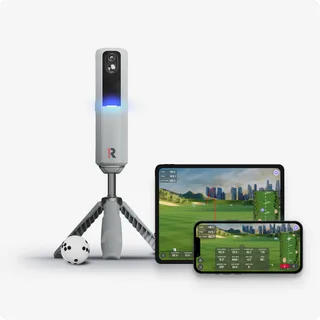
GSPro's platform record captures Windows 10 or Windows 11, 16GB memory, and a GTX 3060 graphics card. The MLM2PRO is a hybrid unit, stacked with two advanced cameras plus Doppler radar, and it is placed behind the ball: Rapsodo's FAQ records 6.5 to 8.5 feet behind the ball, and 8 feet from ball to the net. The captured license record names the GSPro Annual Subscription at 250 dollars per year. Every row above traces to the MLM2PRO with GSPro pairing column or the monitor record; the depth check compares these figures with a measured room.
How to read this page
This page assembles captured records for the MLM2PRO with GSPro pairing. Each support, connection, entitlement, platform, placement and license statement traces to a captured source, quoted as captured on its access date. Absent fields are reported as not stated rather than inferred. Nothing here is tested or recommended; the page documents what the records carry, including their explicit distance figures, and stops there.
Related guides
Sources (4)
GSPro: GSPro Version 3
What launch monitor devices are supported?Read October 18, 2026
What launch monitor devices are supported? · Publication date not stated for this section
Rapsodo MLM2Pro
GSPro Annual SubscriptionRead October 18, 2026
GSPro Annual Subscription · Publication date not stated for this section
The MLM2Pro requires a Premium Membership from Rapsodo
What are the minimum and recommended system requirements?Read October 18, 2026
What are the minimum and recommended system requirements? · Publication date not stated for this section
GSPro requires a Windows PC (Windows 10 or Windows 11)
Frequently Asked QuestionsRead October 18, 2026
Frequently Asked Questions · Publication date not stated for this section
GSPro requires a Windows PC (Windows 10 or Windows 11)
Recommended minimum hardware for 1080p play:Read October 18, 2026
Recommended minimum hardware for 1080p play: · Publication date not stated for this section
16GB memory
Recommended minimum hardware for 1080p play:Read October 18, 2026
Recommended minimum hardware for 1080p play: · Publication date not stated for this section
GTX 3060
Recommended minimum hardware for 1080p play:Read October 18, 2026
Recommended minimum hardware for 1080p play: · Publication date not stated for this section
10GB free space
Recommended minimum hardware for 1080p play:Read October 18, 2026
Recommended minimum hardware for 1080p play: · Publication date not stated for this section
Stable internet Connection
Recommended minimum hardware for 1080p play:Read October 18, 2026
Recommended minimum hardware for 1080p play: · Publication date not stated for this section
Ethernet port and/or BT depending on Launch Monitor
Is GSPro available for MacOS or iOS?Read October 18, 2026
Is GSPro available for MacOS or iOS? · Publication date not stated for this section
No, currently GSPro is only available for Windows PCs.
GSPro Annual SubscriptionRead October 18, 2026
GSPro Annual Subscription · Publication date not stated for this section
GSPro Annual Subscription
GSPro Annual SubscriptionRead October 18, 2026
GSPro Annual Subscription · Publication date not stated for this section
250 / year (USD + any taxes that apply)
What launch monitor devices are supported?Read October 27, 2026
What launch monitor devices are supported? · Publication date not stated for this section
Rapsodo MLM2Pro
GSPro: GSPro + Rapsodo MLM2Pro Connection Guide
Getting Connected:Read October 18, 2026
Getting Connected: · Publication date not stated for this section
The Rapsodo MLM2Pro connects to your Windows PC via Bluetooth.
Rapsodo: Frequently Asked Golf Questions - Rapsodo Golf
What are the ideal space requirements to set up MLM2PRO™ indoors?Read October 27, 2026
What are the ideal space requirements to set up MLM2PRO™ indoors? · Publication date not stated for this section
6.5-8.5 feet behind the ball
What are the ideal space requirements to set up MLM2PRO™ indoors?Read October 18, 2026
What are the ideal space requirements to set up MLM2PRO™ indoors? · Publication date not stated for this section
6.5-8.5 feet behind the ball
What are the ideal space requirements to set up MLM2PRO™ indoors?Read October 18, 2026
What are the ideal space requirements to set up MLM2PRO™ indoors? · Publication date not stated for this section
8 feet is needed from ball to the net
Rapsodo: Rapsodo® MLM2PRO Mobile Launch Monitor + Golf Simulator
Meet MLM2PRO. It's time to upgrade your game.Read October 27, 2026
Meet MLM2PRO. It's time to upgrade your game. · Publication date not stated for this section
Stacked with two advanced cameras plus Doppler Radar to provide video feedback and precise measurement on all golf shots.
This document supports the cited model or software requirement. We have not performed hands-on equipment testing.
GolfCompat provides planning information. Confirm the instructions for your exact equipment and have your room, swing clearance, and installation assessed before use. A listed equipment requirement does not certify personal safety.