
GolfCompat
Garmin R10: Documented Connection Checks
GSPro documents a Bluetooth connection for the R10. Pair it in Windows before starting GSPro, keep GSPro Connect open, and separate connection trouble from unsupported putting. These are vendor instructions; GolfCompat has not tested your installation.
Placement and technology
- Name
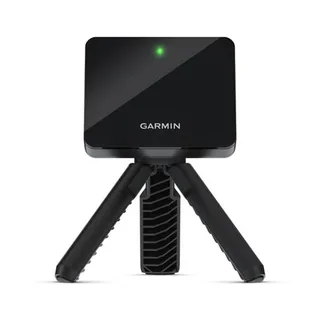
- Garmin R10
- Sensor placement
- Behind the ball
- Measurement technology
- radar
Room measurements
Table help
Scroll sideways to read all columns. Keyboard: focus the table area and use the arrow keys.
| Monitor | Dimension | Measurement endpoints | Published value | Meaning |
|---|---|---|---|---|
| Garmin R10 | Sensor to ball | sensor position to tee | 6 ft (1828.8 mm) to 8 ft (2438.4 mm) | Setup range |
| Garmin R10 | Ball flight | tee to net impact plane | 8 ft (2438.4 mm) | Minimum |
Check the exact device and connection
In Windows, open Bluetooth devices, add a Bluetooth device and hold the R10 button for pairing mode. Select the R10 and pair it. Start GSPro from the desktop launcher, enter the requested license details and select the Garmin R10 option in Connect. The guide says Connect then finds the R10 automatically.
Apply only the documented next steps
Minimize GSPro Connect instead of closing it during play. For an R10 round, choose an auto-putt mode: GSPro’s R10 guide says the device does not support putting. After converting a GSPro license between device types, GSPro says clearing the Connect application is typically necessary. Use the named interface in its illustrated clear-settings guide, then restart GSPro to select the new type. The interfaces differ; use the vendor screenshots rather than a guessed sequence.
Source: GSProRead October 15, 2026
Garmin R10 Setup · Publication date not stated for this section
Before starting GSPro, you need to connect your Garmin R10 to your PC’s Bluetooth.
Captured document guidance for the named model and software. It does not establish a diagnosis or a tested fix for an individual installation.
Source: GSProRead October 15, 2026
How To Clear GSPro Connect Settings · Publication date not stated for this section
Once completed, restart GSPro to be presented with the new selection options.
Captured document guidance for the named model and software. It does not establish a diagnosis or a tested fix for an individual installation.
Related guides
Sources (3)
GSPro: GSPro Version 3
What launch monitor devices are supported?Read November 2, 2026
What launch monitor devices are supported? · Publication date not stated for this section
Garmin R10
Garmin: Preparing for a Shot
Preparing for a ShotRead November 2, 2026
Preparing for a Shot · Publication date not stated for this section
behind the tee location
Preparing for a ShotRead November 2, 2026
Preparing for a Shot · Publication date not stated for this section
bottom edge of the launch monitor sits above the mat
Preparing for a ShotRead November 2, 2026
Preparing for a Shot · Publication date not stated for this section
red alignment line is aligned
Preparing for a ShotRead November 2, 2026
Preparing for a Shot · Publication date not stated for this section
Place the launch monitor on the ground
Preparing for a ShotRead November 2, 2026
Preparing for a Shot · Publication date not stated for this section
Attach the launch monitor to the tripod mount
Preparing for a ShotRead October 18, 2026
Preparing for a Shot · Publication date not stated for this section
between 6 ft. and 8 ft.
Preparing for a ShotRead October 18, 2026
Preparing for a Shot · Publication date not stated for this section
at least 8 ft. (2.4 m) away from the net
Garmin: Accuracy of Approach R10 Radar
Radar AccuracyRead November 2, 2026
Radar Accuracy · Publication date not stated for this section
uses radar to analyze several metrics
This document supports the cited model or software requirement. We have not performed hands-on equipment testing.
GolfCompat provides planning information. Confirm the instructions for your exact equipment and have your room, swing clearance, and installation assessed before use. A listed equipment requirement does not certify personal safety.