
GolfCompat
Mevo+ with E6: Documented Setup Records
Records show a supported pairing, connection method not stated; Mevo+ carries a lifetime E6 Connect bundle. E6 needs Windows 10 64-bit, Intel i5, 8GB RAM, Nvidia 1070 graphics, or iPad. Room records list 7-9 feet behind the tee and 8 feet of ball flight. The records state what a setup documents, not that any room is safe to swing in.
Captured connection and entitlement records
Publisher listings only. GolfCompat has not tested these pairings.
Table help
Scroll sideways to read all columns. Keyboard: focus the table area and use the arrow keys.
| Monitor / software | Support | Connection evidence | Listed by | Publication tier | Complete requirements |
|---|---|---|---|---|---|
| Support documented | Not stated by FlightScope | Monitor manufacturer | Listing published by FlightScope | Listing only; requirements not stated by FlightScope | |
Requirements and source notesConfirm unstated requirements with the manufacturer before buying. Compatibility as published by FlightScope; read by GolfCompat on October 18, 2026. GolfCompat has not tested this pairing. Source cautions
| |||||
Documented host and licence records
Table help
Scroll sideways to read all columns. Keyboard: focus the table area and use the arrow keys.
| Platform | Native application | Documented requirement |
|---|---|---|
| Windows | Yes | Windows 10 64-bit |
| iPadOS | Yes | iPad Pro 1 or later | iPad 5 or later | iPad Air 3 (or later) iPad Mini 5 (or later) |
Published PC requirements
- Processor
- Intel i5 Processor
- Memory
- 8GB RAM
- Graphics
- Nvidia 1070 Graphics Card or equivalent (Dedicated GPU with DirectX 11 Support)
- Storage
- 25GB of Hard Drive Space
- Internet
- Internet Connection
| Software | Listings with a captured record |
|---|---|
| E6 Connect | 6 |
Monitor placement and room records
- Name
- Flightscope Mevo+
- Sensor placement
- Behind the ball
- Measurement technology
- radar
Table help
Scroll sideways to read all columns. Keyboard: focus the table area and use the arrow keys.
| Monitor | Dimension | Measurement endpoints | Published value | Meaning |
|---|---|---|---|---|
| Flightscope Mevo+ | Sensor to ball | sensor position to tee | 7 ft (2133.6 mm) to 9 ft (2743.2 mm) | Setup range |
| Flightscope Mevo+ | Ball flight | tee to net impact plane | 8 ft (2438.4 mm) | Minimum |
What the Mevo+ with E6 records carry
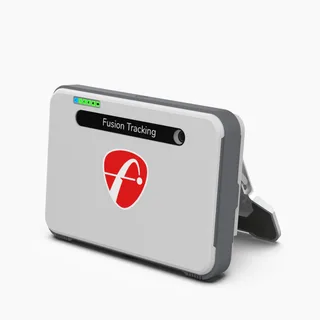
The captured compatibility record lists this pairing as supported, documented by the manufacturer: FlightScope's FAQ states the Mevo+ includes a lifetime E6 Connect bundle covering iOS and PC. The entitlement tier is that lifetime bundle, featuring 12 courses, 17 ranges, and a mini-game, with options to purchase more. The connection method is not stated in the captured records. Required accessories are not stated. Firmware or app version is not stated.
The host computer and the room
E6's platform records cover two hosts. Windows: Windows 10 64-bit, an Intel i5 processor, 8GB RAM, and an Nvidia 1070 graphics card or equivalent, described as a dedicated GPU with DirectX 11 support. iPad: iPad Pro 1 or later, iPad 5 or later, iPad Air 3 or later, or iPad Mini 5 or later. The monitor record places the radar-based Mevo+ behind the tee, with a 7 to 9 foot sensor-to-tee distance and at least 8 feet of ball flight from the tee to the net's impact plane. No license record was captured for E6, so no plan name or price appears here. The Mevo+ and E6 compatibility record and the Mevo+ monitor facts carry the underlying entries, and the room clearance validator compares a room against these figures.
How to read this page
This page only assembles what was captured. The compatibility record supplies the support status and the lifetime entitlement wording; the two platform records supply the Windows and iPad specifications; the monitor record supplies placement and clearance figures. Uncaptured fields are labeled not stated rather than guessed, and because the license record is null, no pricing appears. The page offers no verdict on whether a pairing works in any particular room.
Related guides
Sources (3)
FlightScope: Where should the Mevo+ be placed?
What simulation software is Mevo+ integrated with?Read October 18, 2026
What simulation software is Mevo+ integrated with? · Publication date not stated for this section
Mevo+ includes a lifetime E6 Connect bundle (iOS & PC)
What simulation software is Mevo+ integrated with?Read October 18, 2026
What simulation software is Mevo+ integrated with? · Publication date not stated for this section
Mevo+ includes a lifetime E6 Connect bundle (iOS & PC) featuring 12 courses, 17 ranges, and a mini-game, with options to purchase more.
Can Mevo+ be used indoors and outdoors? How much space is needed?Read October 18, 2026
Can Mevo+ be used indoors and outdoors? How much space is needed? · Publication date not stated for this section
Mevo+ will sit 8 feet behind the tee location.
Do X3C, Mevo Gen2, Mevo and Mevo+ work in low light conditions?Read October 18, 2026
Do X3C, Mevo Gen2, Mevo and Mevo+ work in low light conditions? · Publication date not stated for this section
Radar technology does not require direct sunlight for accurate measurement and is completely unaffected by low light conditions.
FlightScope answers this low-light question for the X3C, Mevo Gen2, Mevo and Mevo+ together. The same answer says Advanced Fusion Tracking needs 300 lux within a 3 foot radius of the hitting location. GolfCompat has not tested the unit.
Can Mevo+ be used indoors and outdoors? How much space is needed?Read October 18, 2026
Can Mevo+ be used indoors and outdoors? How much space is needed? · Publication date not stated for this section
7-9 feet sensor to tee distance
Can Mevo+ be used indoors and outdoors? How much space is needed?Read October 18, 2026
Can Mevo+ be used indoors and outdoors? How much space is needed? · Publication date not stated for this section
8 feet of ball flight minimim
TruGolf: E6 Connect
What Devices Are Compatible with E6 CONNECT Golf Software?Read October 18, 2026
What Devices Are Compatible with E6 CONNECT Golf Software? · Publication date not stated for this section
E6 CONNECT is available for PC and iOS Users.
PC System RequirementsRead October 18, 2026
PC System RequirementsRead October 18, 2026
PC System RequirementsRead October 18, 2026
PC System Requirements · Publication date not stated for this section
Nvidia 1070 Graphics Card or equivalent (Dedicated GPU with DirectX 11 Support)
PC System RequirementsRead October 18, 2026
PC System Requirements · Publication date not stated for this section
25GB of Hard Drive Space
PC System RequirementsRead October 18, 2026
PC System RequirementsRead October 18, 2026
iOS RequirementsRead October 18, 2026
iOS Requirements · Publication date not stated for this section
iPad Pro 1 or later | iPad 5 or later | iPad Air 3 (or later) iPad Mini 5 (or later)
GSPro: GSPro Version 3
What launch monitor devices are supported?Read October 18, 2026
What launch monitor devices are supported? · Publication date not stated for this section
Flightscope Mevo+
This document supports the cited model or software requirement. We have not performed hands-on equipment testing.
GolfCompat provides planning information. Confirm the instructions for your exact equipment and have your room, swing clearance, and installation assessed before use. A listed equipment requirement does not certify personal safety.