
GolfCompat
Mevo+ Simulator Software: Captured Support Records
Captured records list the FlightScope Mevo+ as supported by five simulator titles: Awesome Golf, Creative Golf 3D, E6 CONNECT, GSPro and TGC 2019. GSPro and TGC 2019 connect through publisher interfaces; the other three records leave the connection method unstated. Every listing quotes a vendor page; GolfCompat has not tested these pairings.
Placement and technology
- Name
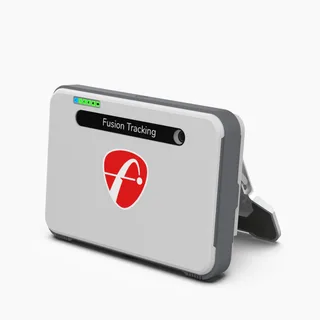
- Flightscope Mevo+
- Sensor placement
- Behind the ball
- Measurement technology
- radar
Room measurements
Table help
Scroll sideways to read all columns. Keyboard: focus the table area and use the arrow keys.
| Monitor | Dimension | Measurement endpoints | Published value | Meaning |
|---|---|---|---|---|
| Flightscope Mevo+ | Sensor to ball | sensor position to tee | 7 ft (2133.6 mm) to 9 ft (2743.2 mm) | Setup range |
| Flightscope Mevo+ | Ball flight | tee to net impact plane | 8 ft (2438.4 mm) | Minimum |
Documented software support
Publisher listings only. GolfCompat has not tested these pairings.
Table help
Scroll sideways to read all columns. Keyboard: focus the table area and use the arrow keys.
| Monitor / software | Support | Connection evidence | Listed by | Publication tier | Complete requirements |
|---|---|---|---|---|---|
Awesome Golf | Support documented | Not stated by FlightScope | Monitor manufacturer | Listing published by FlightScope | Listing only; requirements not stated by FlightScope |
Requirements and source notesConfirm unstated requirements with the manufacturer before buying. Compatibility as published by FlightScope; read by GolfCompat on October 18, 2026. GolfCompat has not tested this pairing. Source cautions
| |||||
Creative Golf 3D | Support documented | Not stated by FlightScope | Monitor manufacturer | Listing published by FlightScope | Listing only; requirements not stated by FlightScope |
Requirements and source notesConfirm unstated requirements with the manufacturer before buying. Compatibility as published by FlightScope; read by GolfCompat on October 18, 2026. GolfCompat has not tested this pairing. Source cautions
| |||||
| Support documented | Not stated by FlightScope | Monitor manufacturer | Listing published by FlightScope | Listing only; requirements not stated by FlightScope | |
Requirements and source notesConfirm unstated requirements with the manufacturer before buying. Compatibility as published by FlightScope; read by GolfCompat on October 18, 2026. GolfCompat has not tested this pairing. Source cautions
| |||||
| Support documented | Publisher connection guide | Both parties | Listing published by GSPro and FlightScope | Listing only; requirements not stated by GSPro and FlightScope | |
Requirements and source notesConfirm unstated requirements with the manufacturer before buying. Compatibility as published by GSPro and FlightScope; read by GolfCompat on October 18, 2026. GolfCompat has not tested this pairing. Source cautions
| |||||
| Support documented | Publisher connection guide | Both parties | Listing published by ProTee United and FlightScope | Listing only; requirements not stated by ProTee United and FlightScope | |
Garmin's SimLink FAQ says TGC2019 is currently being removed from storefronts and some features may no longer be available; confirm availability with ProTee United before buying a licence. Requirements and source notesConfirm unstated requirements with the manufacturer before buying. Compatibility as published by ProTee United and FlightScope; read by GolfCompat on October 18, 2026. GolfCompat has not tested this pairing. Source cautions
| |||||
Documented host requirements by software
GSPro
Table help
Scroll sideways to read all columns. Keyboard: focus the table area and use the arrow keys.
| Platform | Native application | Documented requirement |
|---|---|---|
| Windows | Yes | Windows 10 or Windows 11 |
| macOS | No | No native application. Streaming and virtual machines are outside this check. |
| iPadOS | No | No native application. Streaming and virtual machines are outside this check. |
Publisher’s recommended minimum for 1080p
- Memory
- 16GB memory
- Graphics
- GTX 3060
- Storage
- 10GB free space
- Internet
- Stable internet Connection
- Sensor connection
- Ethernet or Bluetooth, depending on the monitor
The publisher prints “GTX 3060” in this section. Confirm the intended graphics card with GSPro before buying; we have preserved its wording. Higher-resolution recommendations appear in the linked source.
E6 Connect
Table help
Scroll sideways to read all columns. Keyboard: focus the table area and use the arrow keys.
| Platform | Native application | Documented requirement |
|---|---|---|
| Windows | Yes | Windows 10 64-bit |
| iPadOS | Yes | iPad Pro 1 or later | iPad 5 or later | iPad Air 3 (or later) iPad Mini 5 (or later) |
Published PC requirements
- Processor
- Intel i5 Processor
- Memory
- 8GB RAM
- Graphics
- Nvidia 1070 Graphics Card or equivalent (Dedicated GPU with DirectX 11 Support)
- Storage
- 25GB of Hard Drive Space
- Internet
- Internet Connection
The Golf Club 2019
Table help
Scroll sideways to read all columns. Keyboard: focus the table area and use the arrow keys.
| Platform | Native application | Documented requirement |
|---|---|---|
| Windows | Yes | Windows 10 64 bit |
Awesome Golf
Computer requirements have not been verified in the captured platform records. Check the software publisher’s current requirements before choosing a host.
Creative Golf 3D
Computer requirements have not been verified in the captured platform records. Check the software publisher’s current requirements before choosing a host.
Related guides
Sources (6)
GSPro: GSPro Version 3
What launch monitor devices are supported?Read October 18, 2026
What launch monitor devices are supported? · Publication date not stated for this section
Flightscope Mevo+
What are the minimum and recommended system requirements?Read October 18, 2026
What are the minimum and recommended system requirements? · Publication date not stated for this section
GSPro requires a Windows PC (Windows 10 or Windows 11)
Frequently Asked QuestionsRead October 18, 2026
Frequently Asked Questions · Publication date not stated for this section
GSPro requires a Windows PC (Windows 10 or Windows 11)
Recommended minimum hardware for 1080p play:Read October 18, 2026
Recommended minimum hardware for 1080p play: · Publication date not stated for this section
16GB memory
Recommended minimum hardware for 1080p play:Read October 18, 2026
Recommended minimum hardware for 1080p play: · Publication date not stated for this section
GTX 3060
Recommended minimum hardware for 1080p play:Read October 18, 2026
Recommended minimum hardware for 1080p play: · Publication date not stated for this section
10GB free space
Recommended minimum hardware for 1080p play:Read October 18, 2026
Recommended minimum hardware for 1080p play: · Publication date not stated for this section
Stable internet Connection
Recommended minimum hardware for 1080p play:Read October 18, 2026
Recommended minimum hardware for 1080p play: · Publication date not stated for this section
Ethernet port and/or BT depending on Launch Monitor
Is GSPro available for MacOS or iOS?Read October 18, 2026
Is GSPro available for MacOS or iOS? · Publication date not stated for this section
No, currently GSPro is only available for Windows PCs.
FlightScope: Where should the Mevo+ be placed?
Can Mevo+ be used indoors and outdoors? How much space is needed?Read October 18, 2026
Can Mevo+ be used indoors and outdoors? How much space is needed? · Publication date not stated for this section
Mevo+ will sit 8 feet behind the tee location.
Do X3C, Mevo Gen2, Mevo and Mevo+ work in low light conditions?Read October 18, 2026
Do X3C, Mevo Gen2, Mevo and Mevo+ work in low light conditions? · Publication date not stated for this section
Radar technology does not require direct sunlight for accurate measurement and is completely unaffected by low light conditions.
FlightScope answers this low-light question for the X3C, Mevo Gen2, Mevo and Mevo+ together. The same answer says Advanced Fusion Tracking needs 300 lux within a 3 foot radius of the hitting location. GolfCompat has not tested the unit.
What simulation software is Mevo+ integrated with?Read October 18, 2026
What simulation software is Mevo+ integrated with? · Publication date not stated for this section
It also integrates with other top simulation software, including GSPro (PC), Awesome Golf (PC & iOS), The Golf Club 2019 (PC), and Creative Golf 3D (PC)
What simulation software is Mevo+ integrated with?Read October 18, 2026
What simulation software is Mevo+ integrated with? · Publication date not stated for this section
Mevo+ includes a lifetime E6 Connect bundle (iOS & PC)
What simulation software is Mevo+ integrated with?Read October 18, 2026
What simulation software is Mevo+ integrated with? · Publication date not stated for this section
Mevo+ includes a lifetime E6 Connect bundle (iOS & PC) featuring 12 courses, 17 ranges, and a mini-game, with options to purchase more.
Can Mevo+ be used indoors and outdoors? How much space is needed?Read October 18, 2026
Can Mevo+ be used indoors and outdoors? How much space is needed? · Publication date not stated for this section
7-9 feet sensor to tee distance
Can Mevo+ be used indoors and outdoors? How much space is needed?Read October 18, 2026
Can Mevo+ be used indoors and outdoors? How much space is needed? · Publication date not stated for this section
8 feet of ball flight minimim
GSPro: GSPro + Flightscope Connection Guide
Basic Usage:Read October 18, 2026
Basic Usage: · Publication date not stated for this section
Currently, both wifi and wired LAN connections are supported for the GSPro Connect interface. Although, Mevo+ only supports Wifi, other devices support wired connections.
ProTee United: TGC2019 for FlightScope Setup Guide (Mevo+ & X3)
TGC2019 for FlightScope Setup Guide (Mevo+ & X3)Read October 18, 2026
TGC2019 for FlightScope Setup Guide (Mevo+ & X3) · Article timestamp March 9, 2022
TGC2019 for FlightScope Setup Guide (Mevo+ & X3)
STEP 5:Read October 18, 2026
STEP 5: · Article timestamp March 9, 2022
Start the TGC for FlightScope Interface !
STEP 8:Read October 18, 2026
STEP 8: · Article timestamp March 9, 2022
NOTE: The MACHINE ID found under LICENSES and the ACTIVATION CODE you received from FlightScope are required in order to receive your TGC License Key.
TruGolf: E6 Connect
What Devices Are Compatible with E6 CONNECT Golf Software?Read October 18, 2026
What Devices Are Compatible with E6 CONNECT Golf Software? · Publication date not stated for this section
E6 CONNECT is available for PC and iOS Users.
PC System RequirementsRead October 18, 2026
PC System RequirementsRead October 18, 2026
PC System RequirementsRead October 18, 2026
PC System Requirements · Publication date not stated for this section
Nvidia 1070 Graphics Card or equivalent (Dedicated GPU with DirectX 11 Support)
PC System RequirementsRead October 18, 2026
PC System Requirements · Publication date not stated for this section
25GB of Hard Drive Space
PC System RequirementsRead October 18, 2026
PC System RequirementsRead October 18, 2026
iOS RequirementsRead October 18, 2026
iOS Requirements · Publication date not stated for this section
iPad Pro 1 or later | iPad 5 or later | iPad Air 3 (or later) iPad Mini 5 (or later)
ProTee United: The Golf Club 2019 Computer Requirements
Minimum:Read October 18, 2026
Minimum: · Article timestamp September 27, 2024
OS: Windows 10 64 bit
This document supports the cited model or software requirement. We have not performed hands-on equipment testing.
GolfCompat provides planning information. Confirm the instructions for your exact equipment and have your room, swing clearance, and installation assessed before use. A listed equipment requirement does not certify personal safety.